Over the past year, increased regulatory pressure in multiple regions like UK OFCOM and Australia's eSafety has led to higher operational costs, including infrastructure, security, and the need to work with more specialized service providers to keep the site online and stable.
If you value the community and would like to help support its continued operation, donations are greatly appreciated. If you wish to donate via Bank Transfer or other options, please open a ticket.
Donate via cryptocurrency:
Bitcoin (BTC):
Ethereum (ETH):
Monero (XMR):
How to use this forum again ?
Thread starterSimba
Start date
You are using an out of date browser. It may not display this or other websites correctly. You should upgrade or use an alternative browser.
Sorry it's getting a bit confusing to me ,can someone please explain it to me so i can understand a bit better please ?Thankyou and how do you make the writing a bit bigger it's small for my eyes ,sorry :(
Reactions:
RaphtaliaTwoAnimals, lemmeeleev, blueming and 1 other person
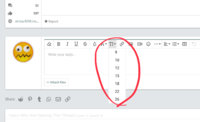
What parts are you having trouble with? You can increase the front size of the text in your post by clicking on the big T above the text box. You might have to highlight the text you want to enlarge first.
Reactions:
lemmeeleev, littlelady774, Deafsn0w and 1 other person
Sorry it's getting a bit confusing to me ,can someone please explain it to me so i can understand a bit better please ?Thankyou and how do you make the writing a bit bigger it's small for my eyes ,sorry :(
I understood that ,but i want all the text of the whollee website big and make it default ,just like with WhatsApp and phones an whatever ,like the interface of the forum
Reactions:
RaphtaliaTwoAnimals, lemmeeleev and Deafsn0w
No it's not chrome either ,just default browser ,i use chrome when it's GIFs related since it displays it better than the default browser..
Or when i need the desktop version of the site
Reactions:
RaphtaliaTwoAnimals, lemmeeleev, Deleted member 4993 and 1 other person
Hey, do you still need help? I use the Xiaomi default browser too - on the bottom right there's an option that looks like three lines, click that and you should see the browser settings. Then you can change the webpage text size ^^
Reactions:
RaphtaliaTwoAnimals, lemmeeleev, Simba and 1 other person
Hey, do you still need help? I use the Xiaomi default browser too - on the bottom right there's an option that looks like three lines, click that and you should see the browser settings. Then you can change the webpage text size ^^
This site uses cookies to help personalise content, tailor your experience and to keep you logged in if you register.
By continuing to use this site, you are consenting to our use of cookies.